
Siemens PLC controls Yamaha robots
Published:2023-01-28 16:00:06
This paper introduces the control strategy of Yamaha robot controlled by Siemens PLC, using the external IO port to set the command word, so that PLC can communicate with the robot, and instruct the robot to finish the corresponding action.
Siemens S7-300PLC is a widely used large and medium-sized PLC in our country now, research on it and peripheral robot control strategy in the field of device automation is of great significance. In this paper, based on the research and production of lithium battery line, the communication and control of Siemens S7300PLC and Yamaha robot are completed, and the research and development of the two key processes of steel bar and stamping in the process of lithium battery device is completed.
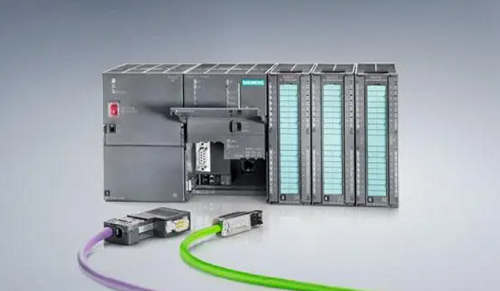
1. Overall hardware design
Siemens S7-300PLC and YAMAHA robot controller connection needs to connect the robot start signal, emergency stop signal, fault signal and reset signal, through the four groups of signals and PLC connection can reach the basic requirements of the control robot. PLC is connected with the robot. Generally, PLC is used as the sending instruction side and the robot is used as the receiving instruction side. In order to reach the purpose of PLC control robot walking to each point, the need to establish PLC and robot IO signal communication.
Combined with the technological research of steel laying and stamping procedures in the process of lithium battery device, it is obtained that the walking points of the robot will not exceed 16 points. According to the calculation of point points by 8421, the connecting points of the robot and PLC are 4 points. The PNP standard robot is selected to be connected with Siemens. The signal connection includes two parts: one part is the start, emergency stop, fault and reset signal; One part is the communication line between PLC and the robot at four points; There are eight sets of signals.
2. Overall software design
Software control strategy for robot inquiry, PLC command method to implement the whole control. Take the stacking robot as an example, the robot sends the signal 1001 inquiry after the return, the robot gets the signal according to the engineering requirements, the robot is instructed to go to the target orientation, the target orientation signal is (0001 -- 1011) a total of 9 points, get the point position robot moves in place, together in place after sending a signal to inform the robot in place, The robot controls the action of other peripherals (cylinders, motors, etc.), and tells the robot to return to position after the action is finished. After the robot returns to position, it continues to wait for the setting instruction. An action loop ends.
Through the communication and control between Siemens S7-300PLC and Yamaha robot, the research and development of steel bar and stamping of two key processes in the process of lithium battery device is completed. PLC and robot through the method of signal transmission end linkage used in the battery device field, has a good demonstration role; Can be used in other battery device sequence, other reference PLC and robot control method and control strategy, can end most of the PLC control robot to the point of work, has a good promotion effect.
-
 202303-02
Mitsubishi servo motors one-button adjustment function
When different servo motors are installed on the machine for the first time, they will occasionally show a poor match with the machinery during operation, which will lead to vibration, noise and other···
-
 202212-29
Schneider instrument maintenance precautions
1. When installing and adjusting the appearance, the original status should be recorded in order to recover.2, repair the appearance of fine instruments, such as accidentally small parts flying, shoul···
-
 202307-20
How to disassemble the five or six axes of the Eston robot?
1. Open the shell of the robot to reveal the motor base.2. Use a screwdriver or wrench to remove the screws on the motor base.3. Remove the screw, lift the motor base, and remove it from the robot.4. ···
-
 202302-24
WEINVIEW prompts the solution to the download mode error
1. Software editing - System Parameter setting -HMI attribute - Port number: 8000 Change, such as 9000;2. Call up the computer Task Manager -- end the process com_e30.exe;3. Restart the computer;4. Qu···
-
 202212-29
Advantech industrial computer can not open the machine what are the reasons?
One is the problem of the industrial computer motherboard, the second is the problem of the industrial computer power supply, the third is the problem of the display.Advantech industrial computer can ···


 +86 13811814778
 +86 13811814778
 Building 26, Liyuan Community, Chaoyang District, Beijing, China